In brief
Every link your affiliates already published has the old platform's tracking code on the end of it, and you cannot make them go back and change it. So your new software has to read that old code and know which partner it belongs to. Get that one thing right and no link breaks. Then move partners, customers and transactions in that order, with a practice run first. Keep both platforms running for a month and compare sales rather than clicks. Collect fresh tax forms, because you are the one paying now. And send your affiliates one email that leads with the only thing they care about: their links still work.
No card. Your published affiliate links keep working.
Why do affiliates' links break when you move platforms?
In shortBecause every link your affiliates published carries the previous platform's tracking code, and your new script may not recognise that code. Then it sees an ordinary visitor who nobody sent. Everything else in a migration is paperwork, and this is the part that costs you money.
A referral parameter is the bit on the end of an affiliate link. It says who sent the visitor. Which one it is depends on the platform: it is via on one, fpr on another, tap_s on a third. Your partners pasted those links into reviews, videos, newsletters and profile bios over months or years. You can't recall a single one of them. Nobody can.
So the whole question is whether the new script reads the old parameter. For example, picture a link in a review from two years ago. If the new script reads what that link carries, it credits the same affiliate, starting the day it goes on your site. If it doesn't, every one of those links is dead from the cutover. Nobody tells you. The affiliate notices when their next statement is empty.
I built the script to read eighteen referral parameters besides its own, in a fixed order, with its own winning a tie. The attribution guide lists them and the script itself is public. So you can check your platform's parameter is there before you move anything. The other half of the trick is the token. A referral token is the handle inside the link that names the partner. Each imported partner keeps their old one. So a link reading ?via=jane still maps to Jane, never to a new id nobody published. Nothing to re-publish.
What moves, and in what order
In shortThree kinds of record, in this order: partners, then customers, then transactions. Payout details and tax forms never move. Every import runs as a dry run first, and every run can be rolled back.
The order is decided by what needs to exist first. Partners have to be there before customers, because each customer is attached to a partner. Customers have to be there before payments, because each payment is attached to a customer. So payments go last. One row each, carrying the customer, the partner, the amount and the date. A row with no amount arrives as a lead rather than a sale.
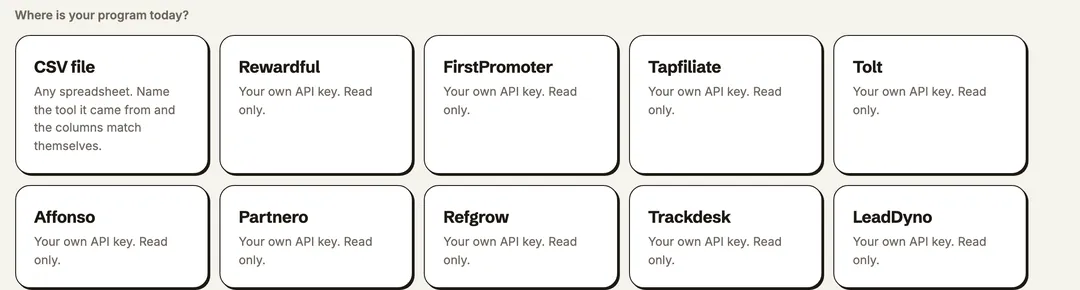
The records come from a spreadsheet, or straight from the old platform with your own API key. That key is used read-only, encrypted for the run, and deleted when the run finishes. Nothing changes on the other side, which is exactly what lets both platforms run at once. Rewardful, FirstPromoter, Tolt, Tapfiliate and Affonso import directly through their APIs. The rest go through a CSV, with the column mapping pre-filled from your own headers. The imports guide has the field lists.
Every import does a practice run first. A dry run is a complete pass that writes nothing. It tells you what it would have created, updated, skipped and failed on. Hold those counts up against your old dashboard, and only run it properly when the two agree. If it still comes out wrong, one click reverses the whole thing.
Two things never move, deliberately. Bank and PayPal details are the first, because those are something a partner hands to whoever is paying them. That is about to be you rather than the previous platform. And tax forms. The next section says why.
How long do you run both platforms?
In shortA month of parallel running costs nothing. Both scripts on the page, both dashboards open, and one full payout cycle on the new side before the old account closes.
There's no required overlap, but a month buys you three things, starting with comparing the two dashboards on the same traffic. You can watch a payout cycle run end to end on the new side, from the sale to the money landing. And the stragglers get credited on whichever side saw them. Those are the people who clicked a link the week before the cutover.
One thing to know before you start comparing. Some older tools are named on EasyPrivacy, the block list most ad blockers ship with. So on a visitor running a blocker, the old script gets stopped and your new one does not. So the old dashboard quietly counts fewer clicks, and the two click numbers will not match. That gap is not a mistake. Compare sales instead. Those come through from Stripe whatever the browser did.
What does not carry over
In shortPortal passwords, raw click logs, cookies already set on visitors' devices, and files stored in the old platform's resource area. People, links, customers, sales and commissions do carry.
| Record | Moves? | What that means for you |
|---|---|---|
| Partners | Yes | Each keeps their old referral token, so their published links keep crediting them. |
| Customers | Yes | Each stays bound to the partner who referred them, so recurring commissions keep going to the right person. |
| Transactions | Yes | One row per payment. A row with no amount becomes a lead. |
| Commission balances | With the transactions | What each partner is owed is there when they arrive. Check the counts against the old dashboard first. |
| Published links | Keep working | The script reads the old parameter. Nobody edits anything. |
| Portal passwords | No | Partners set a new one from the invite. Their identity, links and history are waiting for them. |
| Raw click logs | No | People and money move, not click-by-click traffic. Click counting starts fresh. |
| Cookies on visitors' devices | No | Somebody referred last week is still credited to the old platform until they click any affiliate link again. No vendor can move another vendor's cookies. |
| Hosted files | No | Logos, banners and PDFs in the old resource area need uploading again. |
| Payout details | Never | Partners enter their PayPal or bank details in the new portal, checked by the payment provider as they type. |
| Tax forms | Never | Fresh forms for a new payer of record. The next section. |
Do tax forms carry over?
In shortTreat them as not carrying. A W-8BEN is valid to the end of the third calendar year after it is signed. But does a form collected by one payer cover a different payer? That is a question for your accountant, and the safe answer is fresh forms for a new payer of record.
The expiry rule is the IRS's own, in the W-8BEN instructions. Whether a form given to one company covers a different one is not answered anywhere in plain words. This page will not pretend otherwise. What is certain is this. Imagine you are moving from a platform that paid your affiliates for you, and now the money leaves your own account. Then the name on the payment has changed, and the form was given to the old name.
So collect them again. Turn on required tax forms. Then every partner gets asked for a W-9 or W-8 on their first visit to the portal. Payouts are held until it arrives, because making the money wait is the only enforcement that ever works. The tax forms page covers which form, from whom, and what a UK or EU founder does instead.
Move platforms without losing a published link
Eighteen other platforms' parameters, read from the day the script goes on. Fourteen days, no card.
The one email your affiliates need
In shortOne email, the day the script goes on, with four facts. Their links keep working. The one thing they need to do. When and from where the next payout runs, and who to reply to. Send it yourself, because no platform sends it for you.
The importer emails nobody. A migration report for you is on the backlog rather than in the product today. So the message below is yours to send. It works because it opens with the thing they are actually worried about, and because it names a date.
The email to your affiliates
Subject: The affiliate program moves to a new platform on [date], and your links keep working.
Hi [first name],
From [date] the [program name] affiliate program runs on a new platform. Every link you have already published credits you exactly as it does today. That covers any post, video or newsletter. The new tracking reads the same link. Nothing to edit.
One thing to do. You will get an invite to the new partner portal at [portal address]. Set a password there and check your payout details. Payouts from [date] come from us directly, and the previous platform will not have them.
Your balance and your customers come across with you. The next payout runs on [date]. Nothing else changes.
Reply to this email if anything looks wrong. I will fix it the same day.
[your name]
Then send a second, shorter one, the day the first payout lands on the new side. That's the message that actually ends the worry, and it's the one most merchants forget. Two emails in total.
The order of the day, in nine steps
In shortExport, create, dry-run, run, install, invite, overlap, watch a payout, close. Nine steps, most of them minutes. The one that takes a month is the overlap, and it takes no effort.
The migration checklist
- Export from the previous platform: partners, customers and transactions, because every platform has an export page or an API, and the guide for your platform links it.
- Create the program on the new side and connect billing, which is a read-only connection.
- Dry-run the import, compare the counts with the old dashboard, and fix the mapping until they agree.
- Run it.
- Add the tracking script to your site, and from this moment every old link credits its partner, whichever parameter it carries.
- Send the email above, then invite your partners. Their links, customers and balance are already there when they arrive.
- Run both platforms for a month, and compare sales rather than clicks.
- Watch one payout cycle complete on the new side, with the tax forms in and the money landing.
- Close the old account, and remove its script last.
There's a step-by-step guide for each platform you might be leaving, on the comparison pages. Each has its referral parameter, its export page and what it doesn't carry. Each one is checked against the vendor's own help pages on the date it shows.
How many links does a migration lose?
In shortNo published figure exists, and this page will not invent one. The honest answer is a rule. None, if the new script reads the old parameter and the partner keeps their token. All of them if it does not.
That is why the tracking code is the first question on this page. The export is only the second. You can always run an export again, but nobody is going back to edit a link in a three-year-old video. So check the code before you check anything else.
Common questions
Will my affiliates' old links keep working?
They do, on two conditions: the new script reads the previous platform's referral parameter, and each partner keeps their old token. AffiliateRail's script reads eighteen parameters besides its own, and the importer keeps the token. So a link published years ago credits the same person from the day the script goes on. Check your platform's parameter is in the list before you move.
Do I have to run both platforms at the same time?
There is no required overlap, but a month of running both costs nothing. It lets you compare the dashboards on the same traffic. And it lets you watch one payout cycle finish on the new side before you close the old account.
What does the importer never touch?
Payout details and tax forms. Partners enter their PayPal or bank details in the new portal. They fill in a fresh W-9 or W-8 there, because the payer of record is changing. The importer also never writes anything to the platform you are leaving.
Can I undo an import?
Every run can be undone. Every import dry-runs first with nothing written, and a real run rolls back in one click. Everything it created is removed and everything it updated is restored.
Do my affiliates have to do anything?
One thing. Accept the invite to the new portal, set a password, and check their payout details are there. Their links, customers and balance are already waiting, and the email on this page says exactly that.
Where these facts come from
Fact-checked and reviewed by Jimi Barkway on 4 September 2026. Every figure above was read off the document named here on the date beside it. To contact AffiliateRail about one, email support@affiliaterail.com and the figure is corrected and the date moved.
- AffiliateRail docs, Attribution and tracking: the referral parameters the script reads, in precedence orderchecked 4 September 2026
- The tracking script itselfchecked 4 September 2026
- AffiliateRail docs, Imports: the three record types, the direct importers, the dry run and the rollbackchecked 4 September 2026
- Instructions for Form W-8BEN (IRS): valid to the last day of the third succeeding calendar yearchecked 4 September 2026
- EasyPrivacy (EasyList)checked 4 September 2026