Integrations

Pay affiliates in their own currency through Wise

Your affiliates are paid into their bank account from your Wise Business balance, in their own currency, at Wise's rate when the currencies differ. We prepare each transfer in your account. The money never touches us, and we take no fee. You need a verified Wise Business account, a full-access API token and your business profile ID.

Published 3 September 2026. Every claim on this page was read off the documentation linked below on 3 September 2026. Written by Jimi Barkway, who built AffiliateRail. Jimi has run affiliate programs from both sides of the link. Corrections go to support@affiliaterail.com.

01 Approval

Who approves each transfer?

Where your business is registered decides it. Registered in the United States, Canada, Australia, New Zealand, Singapore or Malaysia: Wise lets us fund each transfer from your balance, and payouts complete on their own.

Registered in the United Kingdom, the EEA or anywhere else: Wise requires you to approve each transfer yourself. We draft it and email you. You sign in to Wise and pay it. The payout is marked paid once Wise sends it. Or register a public key on your Wise account, and we sign each approval instead.

openssl genrsa -out wise-private.pem 2048
openssl rsa -in wise-private.pem -pubout -out wise-public.pem
The key pair for signed approvals. The public half goes to Wise. The private half goes in the Signing key field under Advanced.

02 Setup

What does Wise need from you?

A verified Business account. Wise checks the business before it will hold a balance for it, and payouts are funded from that balance. Open a balance in each currency you pay partners in.

Then an API token set to Full access. A read-only token can look at your account but cannot create transfers, so the connection fails to verify. Paste the token into the panel, choose Find my business profile, and pick the Business one.

Two values, from one account

  • An API token, full access

    Your Account, Connect and manage apps, API tokens. Wise shows it once.

  • Your business profile ID

    A plain number, usually eight digits. The panel finds it for you.

  • A balance per currency

    Funded from your bank. Pay a EUR partner from GBP and Wise converts at its rate.

03 Partners

What do partners give, and what is refused?

Bank details, in their portal, with the same checks Wise applies. A typo becomes an error on their screen rather than a failed payout three days later.

Wise payouts go to bank accounts only: an IBAN, or an account and routing number for US dollars. Email addresses and Wise tags are refused. Before the first batch, send a one-unit test transfer to an account you control. Wise's minimum is one unit of currency.

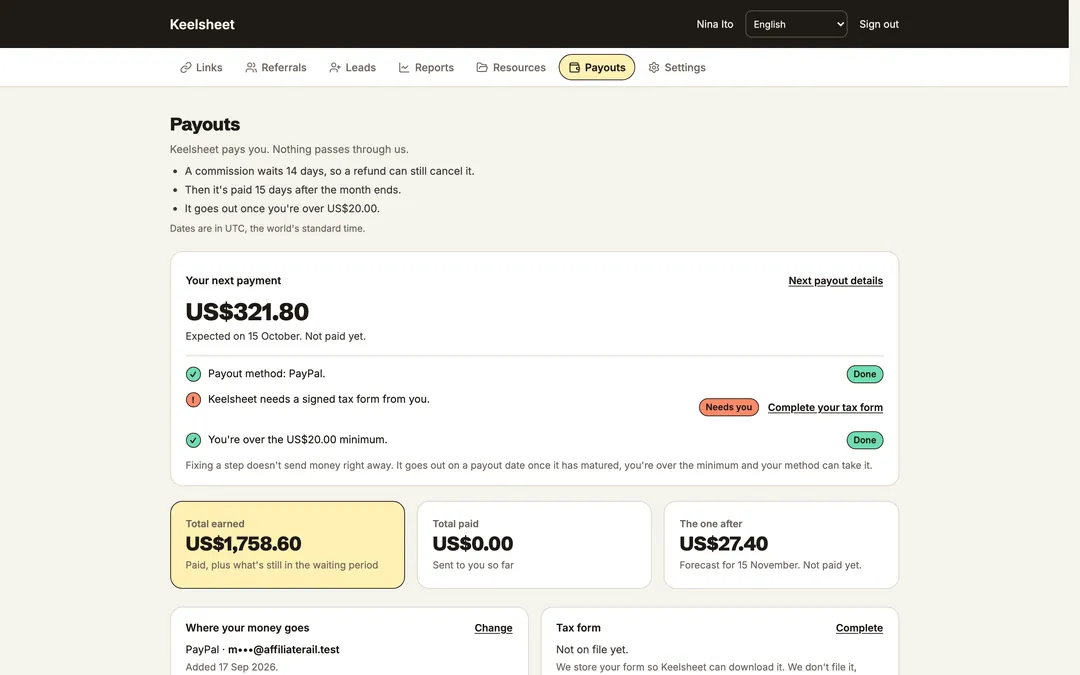
The partner portal's payouts view: the amount due, the amount paid, the next payout date, and where the money goes
The partner's payouts view in the portal: the amounts, the dates, and where the money goes.

Step by step

Connect Wise

Fifteen minutes of your time, plus one to three business days for Wise to verify the business.

  1. Open and verify a Wise Business account

    wise.com/business. Legal name, registration number, directors and owners. Wise emails you when the account is ready.

  2. Create a full-access API token

    Your Account, Connect and manage apps, API tokens. Name it AffiliateRail, set Full access, copy it. Wise shows it once.

  3. Find your business profile

    Paste the token into the panel and choose Find my business profile. Nothing is saved until you choose Save and verify.

  4. Verify and test

    Save and verify, then Send 1.00 to a bank account you control. If Wise asks you to approve it, approve it in Wise and the status here updates.

Said plainly

What the Wise integration does, and does not do

Both lists are read off the same docs pages as everything else here.

It does

  • Pays into bank accounts in the partner's own currency

    From your Wise balance, at Wise's rate when the currencies differ.

  • Checks bank details as the partner types them

    The portal applies Wise's own checks, so errors surface before a batch.

  • Handles the approval rules

    Automatic where Wise allows it. Drafted and emailed for your approval where it does not.

  • Sends a test transfer

    One unit of currency, to an account you control, before any real batch.

  • Takes 0% of every payout

    Wise's own transfer fees and rates apply, the same as paying by hand.

It does not

  • Hold the money

    It goes from your balance to your affiliate. We prepare the transfer. We never receive it.

  • Pay to an email address or a Wise tag

    Bank accounts only: an IBAN, or account and routing for USD.

  • Work with a read-only token

    It cannot create transfers, so verification fails.

  • Override a payment-approval rule

    A rule that covers all payments makes Wise refuse API transfers. Remove it, or exclude API payments from it.

Questions

Common questions

Why does Wise ask me to approve each transfer?

Strong customer authentication, for businesses registered in the UK, the EEA and most other places. We draft the transfer and email you, and you pay it in Wise. Or register a public key on your Wise account and we sign approvals for you.

Which currencies can I pay in?

Any currency you hold a balance in. Pay a EUR partner from a GBP balance and Wise converts at its rate. Tell the panel the balance currency under Advanced.

Does the money pass through AffiliateRail?

No. Each transfer is prepared in your own Wise account and funded from your balance. We take 0%.

Can I rehearse in the Wise sandbox?

Yes. wise-sandbox.com is a separate world with pretend balances. Tick the sandbox box when you save, and use a sandbox-only bank account for the test.

Sources

Where these facts come from

Every claim on this page was read off the product's own documentation on the date shown. The docs change with the product, and then this page is behind until we fix it. Email support@affiliaterail.com and we will correct it and move the date.

Start

Fourteen days to see it work, with nothing on the line

No card. Cancel in one click. Full refund within 30 days of your first payment.