Integrations

Track referred sales through Stripe

Connect your Stripe account and put one script tag on your site. Referred sales are then attributed on their own. AffiliateRail reads charges and invoices through a restricted key and writes nothing. Test mode works the same as live.

Published 3 September 2026. Every claim on this page was read off the documentation linked below on 3 September 2026. Written by Jimi Barkway, who built AffiliateRail. Jimi has run affiliate programs from both sides of the link. Corrections go to support@affiliaterail.com.

01 Attribution

How does a referred sale reach AffiliateRail?

A visitor lands on a partner link. The script records the click and keeps the referral in a first-party cookie on your domain. The default window is 60 days, and the first touch wins.

If you sell through Stripe Checkout, a Payment Link, a Pricing Table or a Buy Button, there is nothing to build. The script stamps the checkout for you. When Stripe reports the payment, the sale lands and your flow prices the commission.

<script async
  src="https://app.affiliaterail.com/rail/v1/rail.js"
  data-rail="prg_xxxx"></script>
The whole install: one tag, under 5 KB, in the head of every page.

02 Server-side

What if I build checkout on my server?

Three lines of code. Read the rail_referral cookie, take its click id, and pass it to Stripe as metadata.rail_referral. Put it on the customer, the subscription or the checkout session, whichever you create.

The docs have the lines in Node, Next.js and Python. Binding is idempotent on the Stripe customer id. The first event that carries a click id wins, and a later one changes nothing.

Four ways a sale is attributed

  • Checkout, Payment Links, Pricing Tables, Buy Buttons

    Nothing to build. The script stamps the checkout.

  • Server-side metadata

    Three lines: read the cookie, take the click id, pass it to Stripe.

  • Coupons

    A Stripe promotion code assigned to a partner. Sales using it attribute without a click.

  • Leads and the API

    Approved leads and API-created customers bind explicitly.

03 Read only

What does AffiliateRail read, and what can it write?

It reads charges, payment intents and invoices. It writes nothing. Stripe's consent screen asks for read and write access, because Stripe closed its read-only scope to new platforms. The key we point at your account is a restricted one that cannot write.

Refunds flow back and correct the commission on their own. Payouts never run through Stripe. They go from your own PayPal or Wise account.

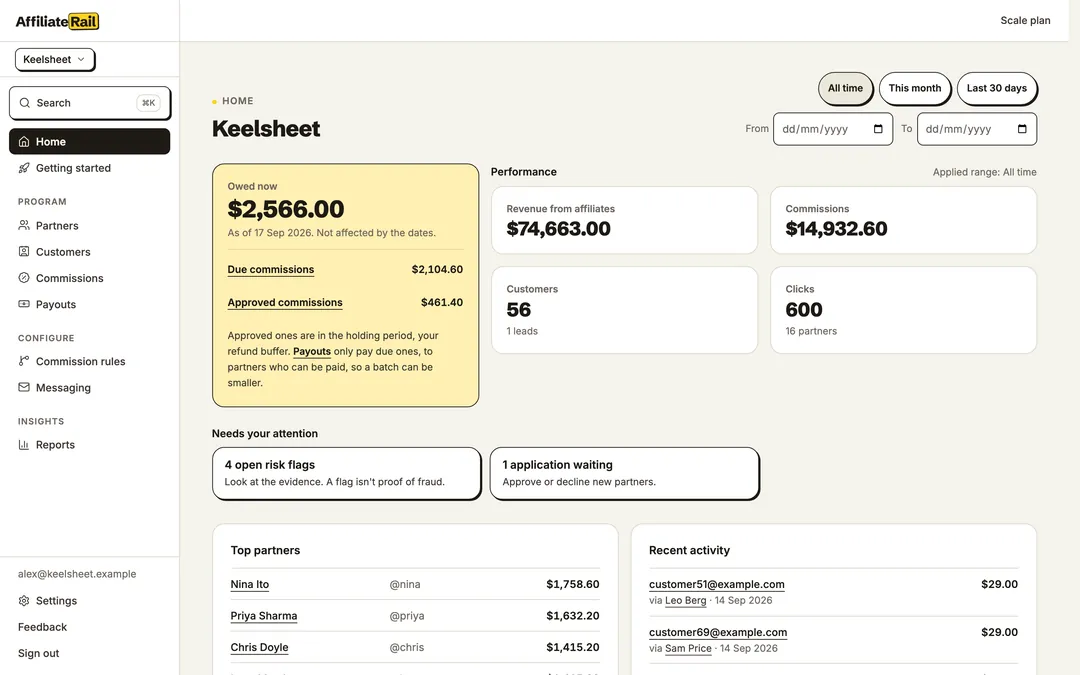
The AffiliateRail dashboard: referrals, commissions and payouts for one program
The dashboard: referrals, commissions and payouts for one program, read from Stripe.

Step by step

From an empty account to an attributed test sale

About fifteen minutes, on test data, before any real money is involved.

  1. Connect Stripe in test mode

    From Getting started, choose Connect Stripe and pick your test-mode account. The event shapes are the same as live.

  2. Put the tag on your site

    One script tag in the head of every page. Settings, Integrations shows it ready to copy with your program id.

  3. Add yourself as a partner

    Getting started gives you a working link. Open your site through it and the verifier turns green when the click lands.

  4. Make a test sale

    Pay with Stripe's test card. The sale appears under Insights, Attribution health, and a commission under Commissions.

Said plainly

What the Stripe integration does, and does not do

Both lists are read off the same docs pages as everything else here.

It does

  • Attributes the Checkout family with nothing built

    Checkout, Payment Links, Pricing Tables and Buy Buttons. The script stamps client_reference_id, even on elements added after load.

  • Reads refunds and corrects the commission

    An unpaid commission is voided. A paid one gets a clawback against the next balance.

  • Works with coupons

    Assign a partner a Stripe promotion code. Sales using it attribute even without a click.

  • Runs the same in test mode

    Connect a test account and prove the whole loop before any real money.

It does not

  • Write to your Stripe account

    The restricted key cannot. Payouts never touch Stripe either.

  • Fingerprint browsers

    A first-party cookie and localStorage. Nothing is read from the device beyond that.

  • Track inside an iframe

    The script refuses, which stops manufactured clicks.

Questions

Common questions

Do I need Stripe Checkout?

No. Checkout, Payment Links, Pricing Tables and Buy Buttons need nothing built. For Stripe Elements or any server-driven flow, pass the click id as metadata.rail_referral. Three lines of code.

Why does Stripe ask for read and write access?

Stripe closed its read-only scope to new platforms. The key AffiliateRail points at your account is a restricted one that can read charges, payment intents and invoices and write nothing.

What happens to a commission when a sale is refunded?

An unpaid commission is voided. An already-paid one gets a negative clawback booked against the partner's next balance.

Can I test it without real money?

Yes. Connect a test-mode account, click your own link and pay with Stripe's test card. The sale shows as attributed under Insights, Attribution health.

Sources

Where these facts come from

Every claim on this page was read off the product's own documentation on the date shown. The docs change with the product, and then this page is behind until we fix it. Email support@affiliaterail.com and we will correct it and move the date.

Start

Fourteen days to see it work, with nothing on the line

No card. Cancel in one click. Full refund within 30 days of your first payment.