Integrations

Attribute sales from your Paddle checkout

If Paddle bills your customers, connect it with an API key and a notification destination. Sales, renewals and refunds then flow into the same ledger, flows and payouts. Attribution rides one field, and Paddle carries it onto every renewal. Budget five minutes.

Published 3 September 2026. Every claim on this page was read off the documentation linked below on 3 September 2026. Written by Jimi Barkway, who built AffiliateRail. Jimi has run affiliate programs from both sides of the link. Corrections go to support@affiliaterail.com.

01 Two things

What do I need from Paddle?

An API key and a notification destination with its signing secret. Paddle has no one-click authorisation, so this is a form rather than a round trip.

The key needs read access to notification settings, transactions, subscriptions, customers and adjustments. If Paddle offers a read-only preset, that is the right one. We never write to your Paddle account.

Sandbox and live are kept apart, on different hosts. A key from one never works against the other, and the card tells you which one you pasted.

What Paddle hands you

  • An API key

    Starts pdl_live_apikey_ or pdl_sdbx_apikey_. Shown once.

  • A signing secret

    Starts pdl_ntfset_. On the notification destination.

  • Your webhook URL

    From Settings, Integrations. Ends in your program id.
02 Attribution

How is a Paddle sale attributed?

One field carries the click id: custom_data.rail_referral on the transaction. Our script fills it when your checkout opens through Paddle.js. If you create transactions on your server, set the same key from the click id in the visitor's cookie.

Paddle then copies custom_data onto the subscription, and back onto every transaction it creates. So the click id rides every renewal on its own, for as long as your commission flow says it should.

// on the Paddle transaction
"custom_data": {
  "rail_referral": "clk_01J..."
}
The one field. Set once at checkout, copied by Paddle onto the subscription and every renewal.

03 Missing sale

What do I check when a sale does not appear?

Work down the list in order. Look at the Paddle card first: it shows the last event we received and when. Then check the delivery in Paddle. A 400 means the signing secret here is not the one on that destination. A 200 means we received it and made a decision.

A customer with no partner against them means the checkout was not stamped. A partner with no commission means no flow matched. The attribution report lists every sale in that state.

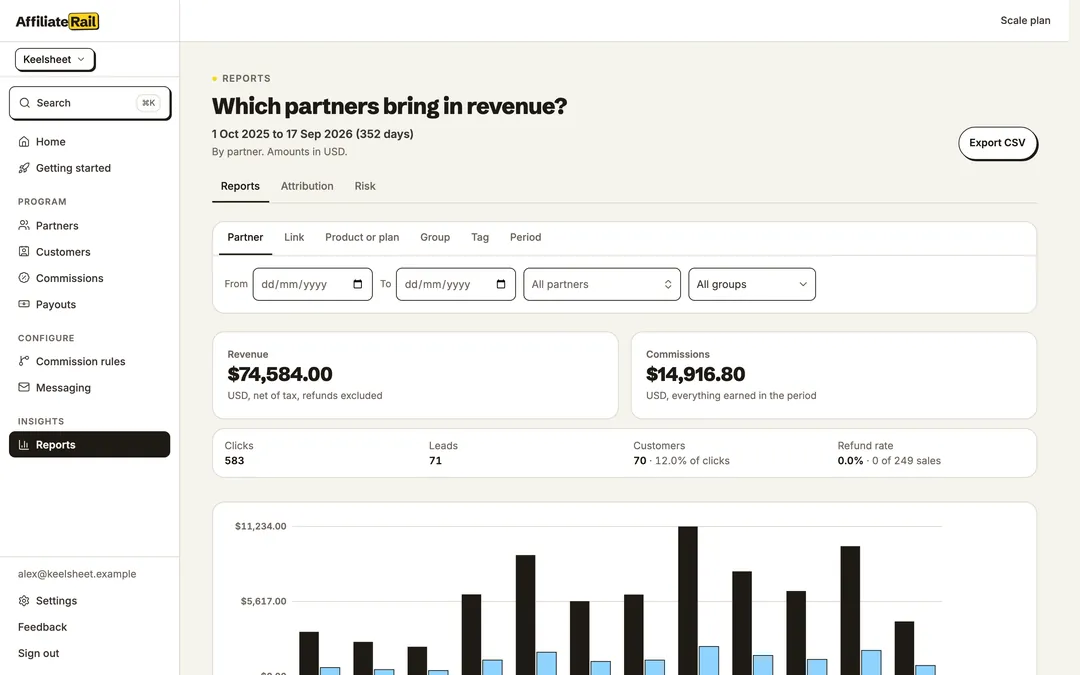
The AffiliateRail reports screen: revenue and commissions cut by partner, with a Direct row that reconciles to the headline
Reports, cut by partner, link, campaign, country, device and period.

Step by step

Connect Paddle in about five minutes

Rehearse in sandbox first if you can. A full transaction with a test card shows the commission before any real money is involved.

  1. Copy your webhook URL

    Settings, Integrations. The Paddle card shows a URL ending in your program id. Copy it exactly.

  2. Create the API key

    In Paddle: Developer tools, Authentication. Read access to notifications, transactions, subscriptions, customers and adjustments. Paddle shows it once.

  3. Create the notification destination

    Developer tools, Notifications. Webhook type, your URL, and the events below. Copy the signing secret.

  4. Connect

    On the Paddle card choose the environment, paste the key and the secret, and save. We call Paddle straight away and tell you one of three results.

Said plainly

What the Paddle integration does, and does not do

Both lists are read off the same docs pages as everything else here.

It does

  • Attributes the first purchase and every renewal

    transaction.completed carries both. subscription.created binds the customer even if the transaction is delayed.

  • Voids a commission when money goes back

    adjustment.created and adjustment.updated carry refunds and chargebacks.

  • Keeps customer status honest

    The subscription events: updated, activated, past_due, paused, resumed, canceled.

  • Checks every signature

    Each notification is checked against your own secret before anything is acted on.

  • Rehearses in sandbox

    Put a full transaction through with a test card and watch the commission appear.

It does not

  • Write to your Paddle account

    The key is read-only by request.

  • Offer one-click authorisation

    Paddle has none. It is a five-minute form.

  • Delete history when you disconnect

    Ingest stops. Every commission, sale, payout and balance stays as it is.

  • Pay partners through Paddle

    Payouts run from your own PayPal, Wise or Payoneer account.

Questions

Common questions

Does Paddle work the same as Stripe here?

Yes. Click to sale to commission to payout, with the same ledger, the same flows and the same payouts underneath. The connection is a form rather than a round trip.

Why is the webhook URL unique to my program?

A Paddle notification carries no field naming the seller who sent it. The URL is the only thing that says a sale is yours. It is not a secret. Every notification is signed and checked.

What if I lose the signing secret?

Delete the destination in Paddle, make a new one, and paste the new secret over the old one. Nothing else breaks.

What does disconnecting do?

Ingest stops immediately. Every commission already earned stays as it is, along with the sales, the payouts and the balances.

Sources

Where these facts come from

Every claim on this page was read off the product's own documentation on the date shown. The docs change with the product, and then this page is behind until we fix it. Email support@affiliaterail.com and we will correct it and move the date.

Start

Fourteen days to see it work, with nothing on the line

No card. Cancel in one click. Full refund within 30 days of your first payment.